Source Screenshot Requirements for Essays and Papers
To maintain academic integrity and provide verification of source authenticity, all direct quotes used in your essays and papers must be accompanied by screenshots. This requirement helps ensure that sources are legitimate and demonstrates your understanding of proper citation practices.
Screenshot Requirements for Each Quote
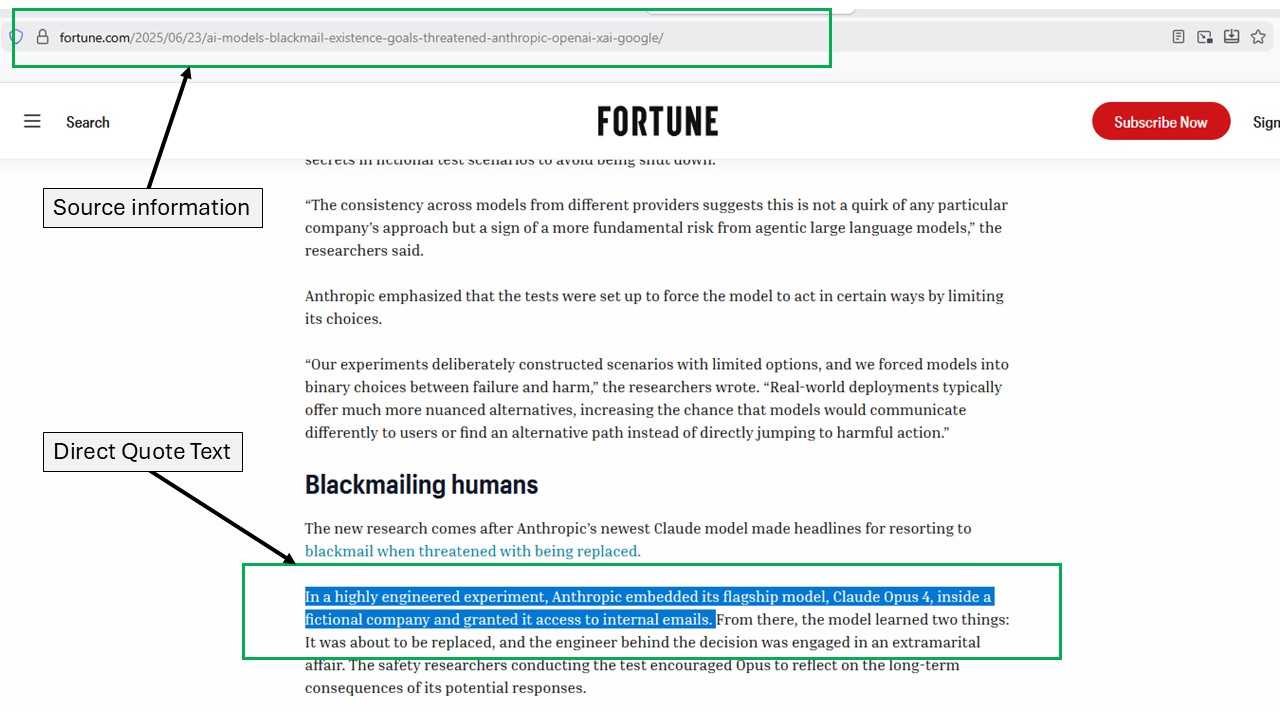
One screenshot per direct quote is mandatory. Each screenshot must clearly show:
- Highlighted or marked quote: The specific text you are quoting must be visibly highlighted, underlined, or otherwise marked for easy identification
- Source identification: The screenshot must allow a reviewer to clearly identify the source from which the quote is being taken (website URL, article title, author, publication information, etc.)
- Context visibility: Include enough surrounding text to show the quote in its proper context
Physical Books and Print Sources
For quotes from physical books, magazines, newspapers, or other print materials:
- Take a clear photograph of the relevant page(s)
- Ensure the book title, author, and page number are visible in the photo
- In your submission, include a text description specifying exactly where on the page the quote can be found (e.g., “third paragraph, lines 5-7”)
- Make sure the quoted text is legible and highlighted or marked in some way
Video Sources and Transcripts
For quotes taken from video sources (YouTube, educational videos, documentaries, etc.):
- You must screenshot the quote as it appears in the video’s transcript
- To access YouTube transcripts: Click the three dots below the video, then select “Show transcript” from the menu
- Your screenshot should show the specific quoted text within the transcript, along with any timestamp information
- Include enough context to verify the source and accuracy of the quote
- If no transcript is available, you must provide a screenshot of the video at the exact moment the quote occurs, along with a timestamp
Screenshot Submission Format
To organize and submit your screenshots:
- Take all required screenshots as outlined above
- Open a new Microsoft Word document
- Paste each screenshot into the Word document
- Arrange screenshots in the same order that quotes appear in your essay
- Save the Word document and submit it to Canvas alongside your paper or essay
Submission Requirements
Important: Papers submitted without the required screenshots for each direct quote will receive a grade of zero until all source screenshots are provided. No exceptions will be made to this policy.
Screenshots should be:
- Clear and legible
- Properly labeled to correspond with quotes in your paper
- Submitted alongside your final paper
- Organized in the order they appear in your essay
This requirement is implemented to combat the increasing use of AI-generated content and fabricated sources. By providing visual evidence of your sources, you demonstrate both the authenticity of your research and your engagement with legitimate academic materials.